
DIAMOND BLUEPRINT - LIVEGOOD SUCCESS
FAQ's
Your support means the world to us! Here is a quick reference document to keep things easy and quick to find.
GETTING AND MANAGING LEADS
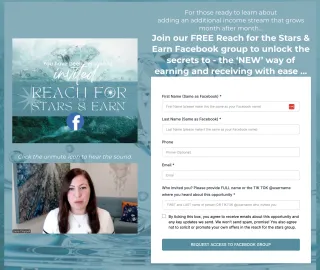
How do I refer leads to Reach for the Stars and Earn Facebook Group?
When someone is interested in this amazing opportunity, send them this shareable link (note it can also be found under “Key Links” see below):
https://reachforthestarsandearn.com/
Make sure they enter YOUR name as the referee. Once they’ve filled in their details, they’ll be directed straight to the RFTS Facebook group.
This is the only link you should be sharing, as this will ensure your leads come into the RFTS group, and that we are capturing their details in the process.
Do not use Facebook’s invite button!
Click here for KEY LINKS: https://diamondblueprint.net/key-links and you can also find them in the KEY LINKS in Boards and Telegram.
There is a comprehensive training in the portal with a video showing how this all works.
How do I find my referrer link?
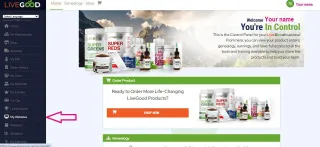
Your referral links are in "My Websites" (see screenshot) in your LiveGood back office.
IMPORTANT: the second link down is the one you use when someone would like to become an affiliate and join your team.
It will say: https://www.LiveGoodTour.com/YOURUSERNAME
Whenever anyone has pre enrolled OR signed up as a member via your link, you will get an email plus you will see them in your back office under "my referrals".
NB : They will NOT be in your Enroller Tree until the following pay day.
There is a comprehensive training in the portal with a video showing how this all works.
How to check if my person has been admitted to the group?
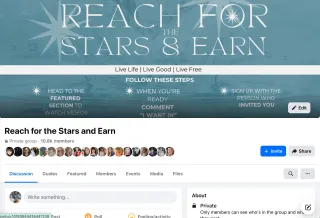
To check if your lead has OPTED IN on the Reach for the stars link you will need to check the Telegram RFTS Leads thread. Note important points this thread:
- if your lead has a thumbs up emoji 👍 your lead has been accepted into the group
- if your lead has the handwriting emoji ✍️ it means admin has made a note about your lead for you
- if your lead has a thumbs down emoji 👎 they have not been accepted and admin will have made a note for you
- if there is no emoji or note they have not yet asked to join or not been accepted yet
You can click on the members count (and magnifying glass tool) in the group and search for your lead by name.
This video explains the process: https://youtu.be/xN_S-Ail6_c
There is a comprehensive training in the portal with a video showing how this all works.
REFER TO TRAINING >> HOW TO USE THE REACH FOR THE STARS LEAD GROUP FUNNEL
How do you get your lead to sign up after they pre enrol?
For your lead to sign up and lock in their current (pre enrolled) position in the matrix they need to pay the $40 affiliate fee and $9.95 for the first month of their membership. This needs to be done by Thursday midnight USA time, each week.
They will then be charged $9.95 per month to keep their membership active. Exactly the same as YOUR membership.
Tell them to go back to the email they got when they pre-enrolled and click on "Join Now” OR USE this link: https://www.securemyposition.com/
NB: We can ALL use the “securemyposition” link, as the lead’s email address links them to their pre enrolment.
There is a comprehensive training in the portal with a video showing how this all works.
REFER TO TRAINING >> HOW TO SHARE YOUR LIVEGOOD LINKS

Apart from FB is there somewhere else we can refer people to to find out more?
Tell them that our Reach for the Stars and Earn FB group is the most thorough place with information on the opportunity, answers to questions already asked, more videos on different parts of the opportunity and people who will be supporting them to make the money they desire.
Ideally they want to be on FB and in the FB group to learn more about the opportunity. They can set up a FB account merely for that purpose if they feel like.
Link to group: https://reachforthestarsandearn.com
IF YOU ARE AN INFINITE WEALTH MEMBER - GET YOUR CUSTOM LINK IN YOUR BACK OFFICE
If the person isn't on facebook (or can't or refuses to become a member) - you can send them a presentation along with the commission structure and your link. There are presentations in Boards under Presentations & Commissions
Do tell them that this method of sharing info about the opportunity is the least recommended as there's no option to meet other people who have already joined and would be supporting them to make the money.
Minicourses off Facebook - COMING SOON
There is a comprehensive training in the portal with a video showing how this all works.
My person has said they have joined up as an affiliate but I haven’t had an email to say they have done so..
Check to see if that email has landed in your spam, and ask for a screenshot of their Affiliate Confirmation Email.
If they say they don’t have one, check “My Referrals” in your back office to see the status of their membership - if they are showing up as a pre-enrollee only, send them a screenshot of their current status and send instructions for them to sign up as an affiliate.
If they have signed up as an affiliate and you have no records of their current membership status, ask them to contact support.
If they have definitely signed up and paid, check your spam for your affiliate confirmation email, if it's not there, please contact [email protected]
There is a comprehensive training in the portal with a video showing how this all works.
WHAT DO I NEED TO SET UP?
What accounts should I set up if going to Diamond?
I'm heading for Diamond; how should I set up my accounts? Get your top 6 to 10 positions asap. Get them as members (minimum) and hold them then upgrade to affiliate later.
Every single person you enroll also falls into the top 6 to 10 positions directly below you. Meaning in Laura’s case, those people are now earning hundreds a month passively which could have been her earning if she had secured those spots. NOTE that those spots will eventually earn 2k a month.
Every single person you personally enrol falls into the matrix of the people below you. You get paid .25 cents of every person in your matrix whether you enrol them or not. Get the spots straight after you and maximise your income. Yes, you earn passively from these positions even if they sit there and don't enrol anyone.
There is a comprehensive training in the portal with a video showing how this all works.
How do I sign up my kids (they are under 18?) & / pets?
How do I set up my kids or pets? When we do this, these accounts are called “Custodian” accounts. This video explains how to create Custodian accounts:
Note that this explains how to set them up as an “Affiliate” not just as a “Member”:
There is a comprehensive training in the portal with a video showing how this all works.
How do I enrol my first 6-10 people?
There are several videos in the Diamond Blueprint Hub (Module 3 Basics to Bronze) course that has this outlined and the benefits of getting this set up correctly.
There is a comprehensive training in the portal with a video showing how this all works.

How do I set up my wallet for EXTRA accounts?
We have outlined some great ways to set up EXTRA bank accounts to enable you to grab these extra accounts. As you need a UNIQUE Credit Card and UNIQUE emails for each account.
We have outlined in our training how to use WISE to create these cards. There are other ways like GIFT Visa cards or transferring credit that will enable this to be achieved.
You are able to use WISE to set up as a payout account in your global ewallet with ipayout also.
There is a comprehensive training in the portal with a video showing how this all works.
What if my top positions are already taken?
We don’t want you to miss setting up your top positions as they are the ones that earn the most. Once these positions are taken either by you (or your family) OR by you starting to enroll other people, they are locked in as they are and cannot be changed.
If this happens, we still highly recommend you enroll your loved ones anyway. No matter where they end up in your matrix. They will still earn at some point.
This is why it is so important to act quickly before these spots are taken.
HOW DO I GET PAID?
How do I set up to ensure I get paid?
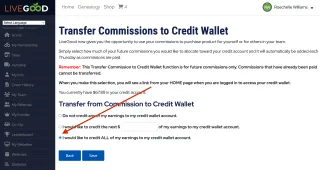
Go to your LiveGood back office and click My earnings > Green button "TRANSFER MY EARNINGS TO CREDIT WALLET" and ensure that you have all earnings going to your CREDIT WALLET until you have your global ewallet set up correctly. Then you can change it over.
There is a comprehensive training in the portal with a video showing how this all works.
How do I activate/set up my eWallet?
You need to have earned over $25 to be sent the next steps to activate your global eWallet with ipayout.
Once you have then the next steps to input your info and activate it will appear.
You will receive an email to set up your global eWallet with ipayout.
There is a comprehensive training in the portal with a video showing how this all works.
What is the difference between the credit wallet & global e-wallet with ipayout?
Your credit wallet is what is held WITHIN the LiveGood platform. You can pay for your membership or purchase products with your credit wallet.
Your global e-wallet is with ipayout where your earnings are SENT (once you have set it up) in order for you to withdraw your earnings into your own bank account.
When you are ready, you can transfer funds to your ewallet for withdrawal to your own bank account.
There is a comprehensive training in the portal with a video showing how this all works.

How can I pay for a membership with my credit wallet
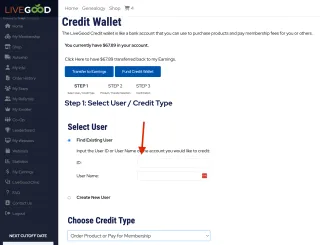
You can use your credit wallet funds to purchase a membership for an existing OR a new account.
Go to MY EARNINGS > CREDIT WALLET > Select New User OR enter the ID or username and select “Order product and pay for a membership”, then follow the prompts.
There is a comprehensive training in the portal with a video showing how this all works.
HOW DO I SET UP MY NEW AFFILIATE?
Where do I send my new affiliate?
You send them the Diamond Blueprint - Quick Start. This is the only link you need to share with your new affiliates gives them access to everything they need:
https://DiamondBlueprint.net/quick-start
Once your new affiliate has signed up and paid their affiliate fee.
✅Give them the above link to get them started on the Diamond Blueprint training.
✅You DO NOT need to give them any other links.
The training will take them through everything they need and give them the links to everything else they need as they complete the training.
Please ensure you support them throughout this process and remind them that if they move through the training, without skipping ahead they will be given access to everything.
If they DO skip ahead, they will not be able to access parts that have not yet unlocked for them.
There is a comprehensive training in the portal with a video showing how this all works.
My new affiliate can’t access the Diamond Blueprint, how do I fix this?
If your new affiliate follows the process EXACTLY as per the instructions in the QUICK START, they will receive access to everything. Note that certain milestones are unlocked by completing the previous one. They must NOT skip ahead!
When they first start, YOU only need to send them one link, which is this quick start link:
diamondblueprint.net/quick-start
By completing the training in the DB hub they will gain access to Telegram, the Diamond Blueprint FB group etc.
If they use any other links they will not gain access to Diamond Blueprint.
You, as their enroller, can check if they have used the correct process by searching their name in the Diamond Blueprint MEMBER Request thread. Meaning there will be a lead notification in THAT when they request access to DB.
There is a comprehensive training in the portal with a video showing how this all works.
How do I fix an error message when I (or someone else) is trying to sign up OR create a custodian account?
This will happen on occasion. First try logging out and closing your browser, waiting a few hours then trying again. If this doesn’t work, then send an email to [email protected]
What happens if I miss paying my membership for a month?
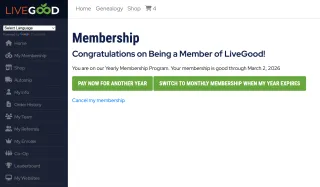
NEVER EVER MISS A PAYMENT! If you miss paying you lose your position and cannot get it back. We recommend upgrading to paying for a year if you can, otherwise set a reminder for each month to ensure this never happens.
What countries cannot participate?
The following countries are on the list of countries that cannot do business with US-based companies. We cannot allow them to participate.
- Afghanistan
- Belarus
- Central African Republic
- Cuba
- Democratic Republic of the Congo
- Ethiopia
- Iran
- Iraq
- Lebanon
- Libya
- Mali
- Myanmar
- Nicaragua
- North Korea
- Palestinian Territory
- Russia
- Somalia
- South Sudan
- Sudan
- Syria
- Yemen
- Zimbabwe
WANT TO KNOW MORE ABOUT THE COMPENSATION PLAN?
I don’t really understand the compensation plan!
I need help understanding the compensation plan. These videos explains how it works:
https://youtu.be/dCIkRzVrW4U?si=XTNEYE4TZbMQYlGc
https://youtu.be/nzxnkTt3b0E?si=U8pvxVHuXnW_Wfo4
There is a comprehensive training in the portal with a video showing how this all works.
How does spillover work?
Spillover explained. This video explains it!
https://youtu.be/Q8yFdEbndPw?si=mpzP_hFQzJBIrvNj
There is a comprehensive training in the portal with a video showing how this all works.
Can you earn from a forced matrix?
Can I earn from a forced matrix? This video explains it!
https://youtu.be/l6sDcQkp6vM?si=Oo0NhqqK2pQB-Dum
There is a comprehensive training in the portal with a video showing how this all works.
What does the subscription economy mean?
What does the term “subscription economy” mean?
There is a comprehensive training in the portal with a video showing how this all works.